en
en  中文(简体)
 中文(繁體)
 Português
 Español
 Pусский
 العربية
 日本語
日本語
 Deutsch
 Français

Hatsune Miku's colorful stage My "world" gameplay sharing
Sep 23 2025
The gameplay of "My World" in Hatsune Miku's colorful stage game will be officially launched on September 26. Many players do not know how to play "My World". Below is a description of the gameplay of "My World" in Hatsune Miku's colorful stage game. Let's take a look!
Hatin Miku Colorful Stage My "World" gameplay
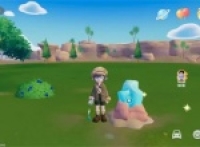
"My World" is a gameplay that creates a "world that belongs only" by collecting various materials and making furniture. You can enter the "world" through the main interface to play.

Material Collection
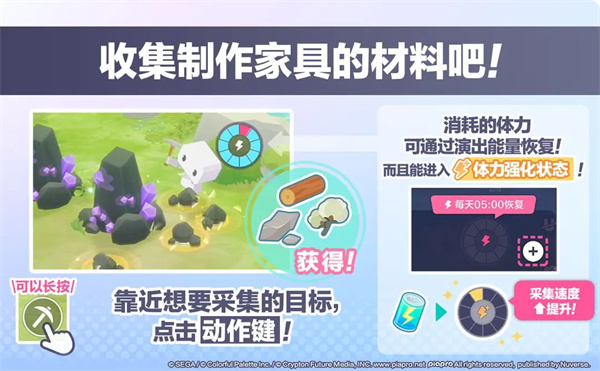
Collection of materials in the "Collection Area" of My World.
Collection of wood, stones and plants can be collected separately. Some materials will only appear in specific "collection areas" or "weather", or therefore increase the probability of occurrence.
In addition to obtaining the materials of Mine World, collecting can also obtain player level experience points, performance points, event points, event badges and other rewards.
In addition, in addition to materials that can be collected directly, some require special "tools" such as "axes" and "picks". This type of tool will be damaged after using it for a certain number of times. Please make it in advance for use.
Also, performing the acquisition action will consume "stamina".
Physical strength is divided into ordinary physical strength, and "strengthening physical strength" that can be restored or increased through performance energy, performance energy drinks and crystals.
Under the effect of strengthening physical strength, not only will the collection speed be increased, but the available points will also increase.
*Ordinary physical strength will not slowly recover over time, but will be restored uniformly at 5:00 every day.
Furniture Production
Furniture can be made using collected materials and "furniture design drawings" on the "workbench". Furniture without design drawings cannot be made, but once you have obtained the design drawings, you can make them repeatedly.
Furniture design drawings can be obtained through the "treasure chest" or "converter" that appear once a day in the collection area.
The workbench is available in the tutorial.
Category and layout of furniture
Furniture can be roughly divided into categories such as "ordinary", "small items", "wall hanging categories", "peripherals", "decorative paintings", "dolls", "walls", "floors", "floors", "home", "road", "fences", and "plants".
"Gate" and communication with characters
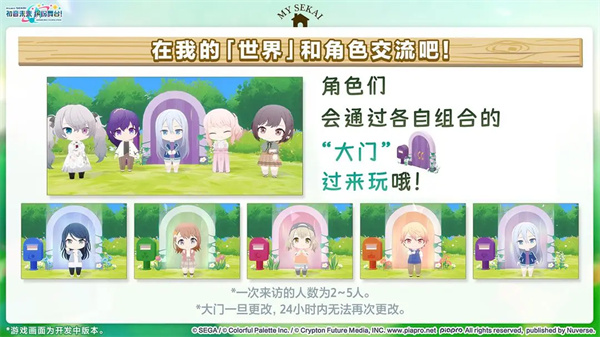
The gate corresponds to 5 combinations, and the corresponding combination of 2 to 5 characters will come to play twice a day through this gate.
The characters who come to play will react in various ways to the weather or furniture arranged in your "My World".
*The "virtual singers" who appeared in My World are those virtual singers who appeared in the early stages of each "world".
*The characters who visit through the gate will change at 5:00 and 17:00 every day.
*Once the gate is changed to another combination of gate, it will take 24 hours to make the next change.
The Memory of the Character
Talk to the visiting character and you can get the "memory" of the corresponding character every day. Memory is the special materials needed to make furniture related to the character and upgrade the door. You must collect it steadily and seriously.
*Memory can be collected again after 5:00 the next day. *Not able to get memory from characters who come to play immediately after changing the gate.
Photography
In Minecraft, you can use the "Photo" function to take photos.
In the "Photo" function, you can choose to take photos or take selfies for others.
The photos taken will be saved in the album of My World. Not only can you appreciate them yourself later, but you can also use display furniture "photo frames" to decorate them.
*Photography requires the use of "film" available from the converter.
*Screenshot functions in venues such as "Photograph" and virtual concerts are different, and the pictures cannot be saved to the currently used device.

Going out
Through the gate, you can go to other people's "world" to play.
You can visit the Mine of a specific player through a friend or search ID, you can also visit the Mine of a random player through a random game, and you can also visit the Mine of a 6 different theme layouts.
In addition, the visit settings for Mine World can be changed through Mine World > Mine World Settings > Options. Accepted visitors can be set to "Anyone", "Friends Only", "Reject", and when set to "Reject", Mine World" will be turned off for other players.
*Expose my "world", you need to pass��nuclear.
*When other players are offline, they can also visit the player.
*In addition to the gate, you can also visit directly through the "Go to My World" button on the profile interface.
*The "Sightseeing" function that appears on the outing interface after the update will not be unlocked when it is launched for the first time. Stay tuned for subsequent news.